
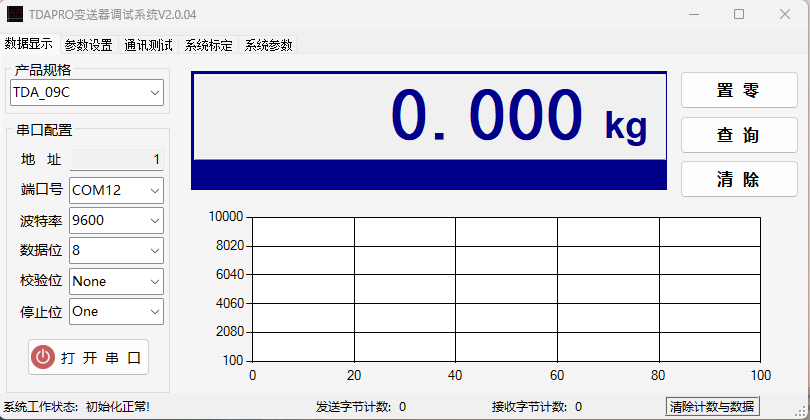
In the world of industrial weighing, accuracy isn’t just a goal—it’s a requirement. To ensure your AUTODA TDA Series indicators perform at their absolute peak, we are proud to introduce TDA Pro, the dedicated calibration and management software designed specifically for the TDA ecosystem.
What is TDA Pro?
TDA Pro is a comprehensive Windows-based utility designed to streamline the configuration, calibration, and monitoring of AUTODA TDA weighing controllers. Whether you are managing a single scale or a complex industrial network, TDA Pro eliminates the hassle of manual keypad calibration and brings professional-grade tools to your PC.
Key Features & Capabilities
-
Seamless Digital Calibration
Perform zero and span calibrations directly from your laptop. No more tedious navigation through instrument menus; TDA Pro provides a clear, visual interface for adjusting weighing parameters.
-
Real-Time Data Visualization
Monitor weight values, status bits, and I/O signals in real-time. The software offers a live dashboard to ensure your system is communicating perfectly with your PLC or PC.
-
Parameter Backup & Restore
Safety first. TDA Pro allows you to save your indicator’s entire configuration to a local file. If a unit needs replacement, you can “clone” the settings to a new device in seconds.
-
Advanced Diagnostics
Quickly identify load cell errors, communication timeouts, or hardware fluctuations. The diagnostic suite helps minimize downtime by pinpointing issues before they halt production.
-
Multi-Interface Support
Whether you connect via RS232, RS485 (Modbus RTU), or Ethernet, TDA Pro detects and manages your AUTODA devices with ease.
Supported Hardware
TDA Pro is optimized for the entire AUTODA TDA lineup, including:
-
TDA-08: High-speed weighing and batching.
-
TDA-10: General purpose industrial weighing.
-
TDA-700/800 Series: Advanced process control indicators.
Why Choose TDA Pro?
Manual calibration is prone to human error and takes time. By using TDA Pro, technical teams can ensure consistent accuracy, maintain detailed digital logs of calibration history, and accelerate the commissioning process for new installations.
Expert Tip: Always ensure your PC’s COM port settings (Baud Rate, Parity, and Data Bits) match your TDA indicator’s settings before initiating a connection in TDA Pro.
Get Started Today
Ready to take control of your weighing accuracy? Download the latest version of TDA Pro from our support portal or contact our technical team for a guided walkthrough.
[Download TDA Pro Software] | [Contact Support]
Quick Technical Specs
| Feature | Specification |
| Operating System | Windows 7 / 10 / 11 |
| Communication | Modbus RTU / ASCII |
| Connection Type | DB9 Serial / USB-to-RS485 / RJ45 |
| Language | Chinese |