
🔧 Introduction
Siemens TIA Portal V21 (Totally Integrated Automation Portal) is the latest and most advanced engineering software platform developed by Siemens for industrial automation. It provides a unified environment to configure, program, simulate, and monitor automation systems including PLCs, HMIs, and drives.
With continuous improvements in performance, usability, and integration, TIA Portal V21 is an essential tool for engineers working with Siemens S7-1200, S7-1500, and WinCC systems.
✨ Key Features of TIA Portal V21
- ⚡ Improved Performance
Faster project loading, compiling, and downloading compared to previous versions. - 🧠 Enhanced Programming Experience
Better LAD, FBD, and SCL editors with smarter suggestions and diagnostics. - 🖥️ Advanced HMI Development (WinCC)
More powerful UI design tools and improved runtime performance. - 🔗 Better System Integration
Seamless integration between PLC, HMI, drives, and industrial networks. - 🛠️ Optimized Diagnostics & Troubleshooting
Easier fault detection and system monitoring tools. - 🔄 Version Control & Team Collaboration
Improved support for multi-user engineering environments.
💻 System Requirements
Before installing TIA Portal V21, ensure your system meets the following:
- OS: Windows 10 / Windows 11 (64-bit)
- CPU: Intel Core i5 or higher
- RAM: Minimum 16GB (32GB recommended)
- Storage: At least 50GB free disk space
- GPU: Optional but recommended for better UI performance
📥 Download TIA Portal V21
👉 Click the link below to download the full version:
🔗 Download Link:
1. SIMATIC STEP 7 Professional 2021 SR4 (.ISO)
File download :
TIA_Portal_STEP7_Safety_WinCC_V21_DVD2_V21
TIA_Portal_STEP7_Safety_WinCC_V21
2. SIMATIC PLC SIM V21 (.ISO)
File download : PLC SIM V21
3.SIMATIC WinCC Unified PC Runtime V21
File download: SIMATIC_WinCC_Unified_RT_V21
……
⚠️ Note: This software is large in size. Please use a stable internet connection when downloading.
🛠️ Installation Guide
- Extract the downloaded files
- Run Setup.exe as Administrator
- Follow the installation wizard
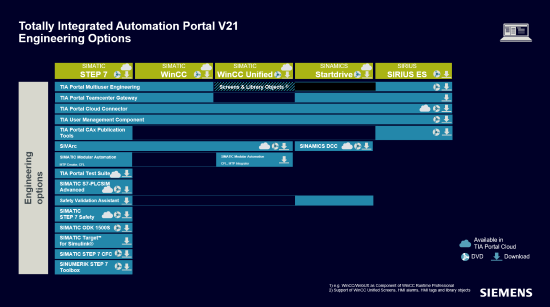
- Select required components (STEP 7, WinCC, Startdrive, etc.)
- Restart your computer after installation
🔑 Licensing
TIA Portal V21 requires a valid Siemens license to run fully.
- You can use Trial License for testing
- For full functionality, purchase an official license from Siemens
👉 If you need a license or support, feel free to contact us.
🌐 Why Choose TIA Portal?
TIA Portal is widely used in industries such as:
- 🏭 Manufacturing Automation
- 💧 Water Treatment Systems
- ⚡ Energy & Power Management
- 🚛 Smart Logistics & Infrastructure
It helps engineers reduce engineering time, improve system reliability, and standardize automation workflows.
📢 Support & Community
If you find this useful:
- 👍 Like & Share
- 💬 Leave a comment with your questions
- 🤝 We will support you for free
📞 Contact Us
If you need help with installation, licensing, or automation projects:
👉 Visit: https://plcworldhub.com/
👉 Email: plcworldhub.com@gmail.com