
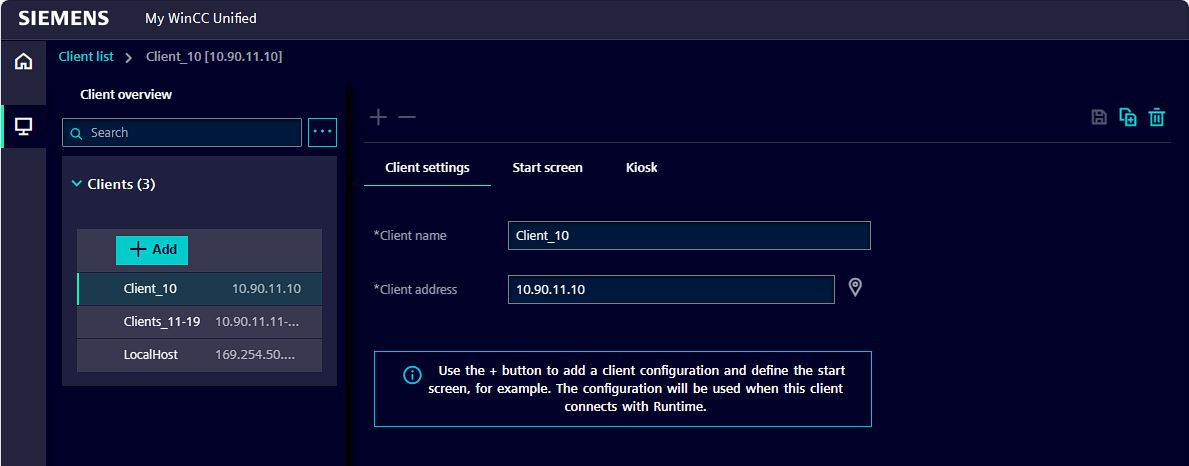
SIMATIC WinCC Unified Station Configurator (RT Unified) is a configuration tool integrated in TIA Portal V21, designed to help engineers deploy and manage WinCC Unified Runtime systems efficiently.
This tool allows you to configure PC-based HMI/SCADA stations, enabling quick setup and operation of industrial visualization systems.
⚙️ What is WinCC Unified Station Configurator?
WinCC Unified Station Configurator is used to:
- Install and configure WinCC Unified Runtime (RT Unified)
- Manage runtime environments on industrial PCs
- Set up operator stations for monitoring and control systems
- Simplify deployment of SCADA/HMI applications
It plays an important role in building modern SCADA systems with Siemens technologies.
✨ Key Features
- 🖥️ Easy Runtime Configuration
Quickly configure and deploy WinCC Unified Runtime on PC stations. - 🔄 Centralized Management
Manage multiple HMI/SCADA stations in a unified environment. - 🌐 Web-based Visualization Support
Enable browser-based access for monitoring and control. - 🔐 Secure Operation
Supports modern security mechanisms and controlled access. - ⚡ High Flexibility & Scalability
Suitable from single-machine systems to large distributed plants.
🏭 Application Areas
WinCC Unified Station Configurator is widely used in:
- Industrial automation systems
- Water treatment plants
- Manufacturing lines
- Energy and infrastructure systems
It helps engineers deploy SCADA systems faster and more reliably.
⚠️ Requirements & Notes
- Requires WinCC Unified Runtime environment
- Compatible with TIA Portal V19 and above
- Does NOT support simulation-type runtime projects
- Kiosk mode may have limitations depending on Windows settings
💡 Why Use WinCC Unified?
WinCC Unified is a modern SCADA/HMI platform that offers:
- Real-time data monitoring and control
- Open connectivity (OPC UA, web technologies)
- Scalable architecture for small to large systems
- Integrated data logging and analytics
It bridges the gap between OT (Operational Technology) and IT systems, enabling smarter industrial operations.
📥 Download WinCC Unified Station Configurator
👉 Download the official document and tool here:
🔗 https://support.industry.siemens.com/cs/document/109827849
👉 Download the official document and tool with google:
Version 21 UPD 1


Version 21
Version 20
Version 19
SetupV19 UPD 2 SR1: SIMATIC_WinCC_Unified_Station_Configurator_V19_Upd2_SR1.exe (226,1 MB)
SetupV19 UPD 3: SIMATIC_WinCC_Unified_Station_Configurator_V19_Upd3.exe (237,0 MB)(SHA-256)
⚠️ Note: Please ensure your system meets all requirements before installation.
📢 Support
If you need help with:
- Installation
- Configuration
- TIA Portal / PLC / SCADA projects
👉 Visit: https://plcworldhub.com/
👉 Contact us for free support
👍 Community
If this article is helpful:
- Like & Share
- Leave a comment with your questions
- We will support you as soon as possible